
Web App Mode
Web App Mode
Xplorer can run as either a Tauri desktop app (default) or a standalone web app backed by any HTTP server that implements the API contract described below.
Architecture
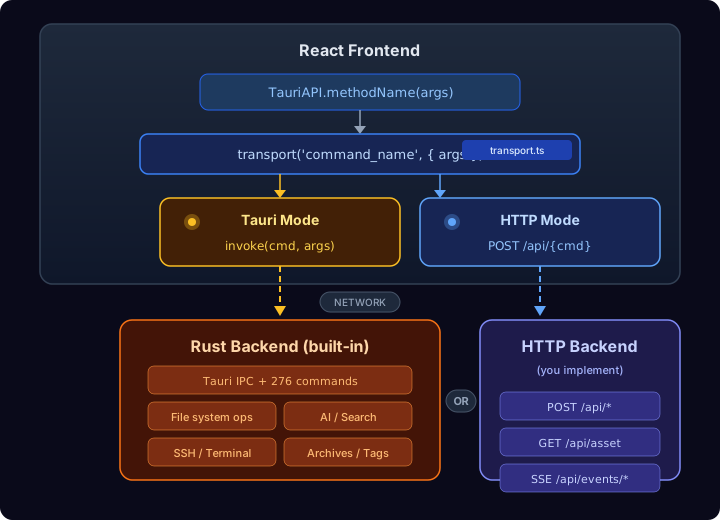
The frontend is identical in both modes. A single transport layer (client/src/lib/transport.ts) auto-detects the runtime and routes calls accordingly.
Quick Start
1. Set environment variables
Create a .env file in the project root (see .env.example):
VITE_API_MODE=http
VITE_API_URL=http://localhost:8080
VITE_API_MODE—"http"forces web mode. If omitted, auto-detected viawindow.__TAURI__.VITE_API_URL— Base URL of your backend server. Defaults tohttp://localhost:8080.
2. Build the frontend
cd client
npm run build        # or: npx vite build
This produces a dist/ folder with static HTML/JS/CSS.
3. Serve the frontend
Serve dist/ with any static file server (nginx, Caddy, npx serve dist, etc.). The frontend will make API calls to VITE_API_URL.
4. Implement the backend
Your backend must implement the API contract below. See the Command Reference for the full list.
API Contract
Commands
Every Xplorer command is called via:
POST /api/{command_name}
Content-Type: application/json

{ ...args }
Response: JSON body with the command's return value. Status 200 on success.
Errors: Non-2xx status with a plain text or JSON error message body.
Void commands: Return status 200 with an empty body or null.
Example
# List directory contents
curl -X POST http://localhost:8080/api/list_directory \
  -H 'Content-Type: application/json' \
  -d '{"path": "/home/user/Documents", "showHidden": false}'

# Response:
# [
#   { "name": "file.txt", "path": "/home/user/Documents/file.txt", "is_dir": false, "size": 1024, ... },
#   ...
# ]
Asset Serving
Media previews (images, videos, PDFs) request assets via:
GET /api/asset?path={encoded_file_path}
Return the file contents with the correct Content-Type header (e.g. image/png, video/mp4).
Events (Server-Sent Events)
Some features subscribe to backend events (terminal output, file operation progress, duplicate scan progress). In HTTP mode these use SSE:
GET /api/events/{event_name}
Return an SSE stream. Each message is a JSON-encoded payload:
data: {"progress": 50, "message": "Copying files..."}
Event names used by the frontend
| Event | Payload | Used by |
| ---------------------------- | ----------------------------------- | --------------------- |
| terminal-output | string | Terminal panel |
| file-operation-progress | { operation, progress, message } | File operations |
| agent-event | AgentEvent object | AI agent chat |
| global_shortcut_triggered | ShortcutAction | Keyboard shortcuts |
| duplicate-scan-progress | { phase, progress, message, ... } | Duplicate finder |
| recommendations-progress | { phase, progress, message } | Recommendations panel |
| storage-analytics-progress | { phase, progress, message } | Storage analytics |
Command Reference
The frontend calls 215 commands through TauriAPI (client/src/lib/tauri-api.ts). Each static method maps 1:1 to a POST /api/{command_name} endpoint.
Below are the most commonly used commands grouped by category. Refer to tauri-api.ts for the full list with exact parameter names and TypeScript types.
File Operations
| Command | Parameters | Returns | Description |
| ---------------------------------- | ------------------------------------------ | -------------- | ---------------------------- |
| list_directory | path, showHidden | FileEntry[] | List directory contents |
| read_text_file | path | string | Read file as text |
| agent_write_file_with_permission | filePath, content, permissionGranted | void | Write text file |
| create_directory | path | void | Create a directory |
| delete_items | paths | void | Delete files/directories |
| rename_item | oldPath, newPath | void | Rename/move item |
| copy_items | sources, destination | void | Copy files |
| move_items | sources, destination | void | Move files |
| get_file_metadata | path | FileMetadata | Get size, dates, permissions |
Search
| Command | Parameters | Returns | Description |
| ---------------------- | ----------------------------------- | ----------------------- | ---------------------------- |
| search_files | query, searchPath, maxResults | SearchResult[] | Search by filename |
| search_file_contents | query, searchPath, maxResults | ContentSearchResult[] | Search within file contents |
| enhanced_search | query, searchPath, maxResults | SearchResult[] | AI-enhanced search |
| parse_search_query | query | StructuredQuery | Parse NL query to structured |
System
| Command | Parameters | Returns | Description |
| ------------------ | ---------- | ------------- | ----------------------------- |
| get_drives | — | DriveInfo[] | List mounted drives |
| get_home_dir | — | string | User home directory path |
| open_in_default | path | void | Open file with OS default app |
| open_in_terminal | path | void | Open terminal at path |
| get_system_info | — | SystemInfo | OS, CPU, RAM info |
Bookmarks & Tags
| Command | Parameters | Returns | Description |
| ----------------- | ---------------------- | ----------------- | ------------------- |
| get_bookmarks | — | BookmarkEntry[] | List bookmarks |
| add_bookmark | path, name, icon | void | Add bookmark |
| remove_bookmark | path | void | Remove bookmark |
| get_file_tags | path | FileTag[] | Get tags for a file |
| set_file_tag | path, tag | void | Set tag on file |
Archive Operations
| Command | Parameters | Returns | Description |
| ------------------ | ---------------------------------- | ------------- | --------------------- |
| compress_files | sources, destination, format | void | Create archive |
| extract_archive | archivePath, destination | void | Extract archive |
| get_archive_info | path | ArchiveInfo | List archive contents |
Web Mode Limitations
| Feature | Desktop (Tauri) | Web Mode |
| ------------------------------- | -------------------------------- | -------------------------------------------- |
| Window controls (min/max/close) | Native controls | Hidden — browser handles this |
| Native drag & drop | Tauri DnD events with file paths | HTML5 DnD only (no file path access from OS) |
| Global keyboard shortcuts | Registered via OS | Browser shortcuts only |
| File dialogs (open/save) | Native OS dialogs | Must use <input type="file"> or custom UI |
| System tray | Supported | Not available |
| Auto-updater | Built-in | Not available |
| Asset protocol | https://asset.localhost/ | Must proxy through /api/asset |
Implementing a Compatible Backend
If you want to build a backend that works with Xplorer's web mode:
- Start with the command list in
client/src/lib/tauri-api.ts. Eachtransport('command_name', { args })call is an endpoint you need. - Match the Rust types in
src-tauri/src/for request/response shapes. - Implement incrementally — start with
list_directory,get_drives,get_home_dir, andread_text_fileto get basic browsing working, then add more commands as needed. - Use SSE for any event-based features (terminal, progress bars).
- Serve assets via
/api/asset?path=...with proper MIME types and streaming for large files. - CORS: If the frontend and backend are on different origins, configure CORS headers on your backend.