
Frontend Architecture
Frontend Architecture
The Xplorer frontend is a React 18 single-page application bundled with Vite and rendered inside a Tauri WebView.
Technology Stack
| Technology | Purpose | | -------------------- | ------------------------------- | | React 18 | UI framework | | TypeScript 5.6 | Type safety | | Vite 5 | Build tool and dev server | | Wouter | Lightweight client-side routing | | TanStack React Query | Server state management | | Tailwind CSS 3 | Utility-first styling | | Lucide React | Icon library |
Routing
Xplorer uses Wouter for routing, defined in App.tsx:
| Route | Component | Description |
| ----------- | ----------------- | ----------------------- |
| / | ExplorerUnified | Main file explorer |
| /explorer | ExplorerUnified | Alias for main explorer |
| /settings | Settings | Application settings |
| * | NotFound | 404 fallback |
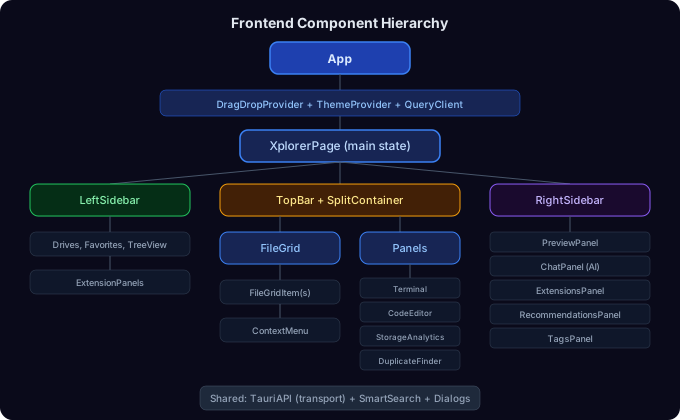
Component Hierarchy
State Management
Xplorer uses a combination of:
Local State (useState)
The main xplorer.tsx component manages ~40 state variables for UI state like current path, selected files, sidebar visibility, etc. UI state is persisted to localStorage across sessions.
TanStack React Query
Used for caching and managing async data from the Tauri backend:
const queryClient = new QueryClient({
  defaultOptions: {
    queries: {
      refetchInterval: false,
      refetchOnWindowFocus: false,
      staleTime: Infinity,
    },
  },
});
Custom Hooks
| Hook | File | Purpose |
| ------------------- | ------------------------------ | ------------------------------------- |
| useShortcuts | hooks/use-shortcuts.ts | Global keyboard shortcut handling |
| useToast | hooks/use-toast.ts | Toast notification system |
| useFolderSizes | hooks/use-folder-sizes.ts | Async folder size calculation |
| useSplitLayout | hooks/use-split-layout.ts | Split view layout management |
| useVimMode | hooks/use-vim-mode.ts | Vim-style keyboard navigation |
| useDraggable | hooks/use-draggable.ts | Drag source behavior for files |
| useDroppable | hooks/use-droppable.ts | Drop target behavior for files |
| useExternalDrop | hooks/use-external-drop.ts | External file drop handling |
| useFileComparison | hooks/use-file-comparison.ts | File comparison utilities |
| useTour | hooks/use-tour.ts | Guided tour overlay state |
| useDialogs | hooks/use-dialogs.ts | Dialog management |
| useClipboard | hooks/use-clipboard.ts | Clipboard operations (cut/copy/paste) |
Tauri API Bridge
All communication with the Rust backend goes through lib/tauri-api.ts. This file provides a typed TauriAPI object that wraps every invoke() call:
// Example: Reading a directory
const files = await TauriAPI.readDirectory('C:\\Users');

// Under the hood:
invoke('read_directory', { path: 'C:\\Users' });
See Frontend API Reference for the complete list.
File Preview System
Xplorer uses a preview factory pattern to dynamically load preview components based on file type:
preview-factory.ts
├── Detects file type from extension
├── Maps to preview category (image, pdf, code, document, etc.)
└── Lazy-loads the appropriate preview component
    ├── ImagePreview (PNG, JPG, GIF, SVG, WebP)
    ├── PDFPreview (PDF via react-pdf)
    ├── CodePreview (source code with syntax highlighting)
    ├── DocumentPreview (DOCX via mammoth)
    ├── SpreadsheetPreview (XLSX via xlsx)
    ├── CsvPreview (CSV via papaparse)
    ├── JsonPreview (JSON with syntax highlighting)
    ├── MarkdownPreview (MD with rendered HTML)
    ├── VideoPreview (MP4, WebM, etc.)
    ├── AudioPreview (MP3, WAV, OGG, etc.)
    └── TextPreview (plain text fallback)
Styling
Xplorer uses a custom glassmorphic dark theme built on Tailwind CSS:
- Base theme: Tokyo Night inspired color palette
- Glass effects:
backdrop-blurand semi-transparent backgrounds - Theme system: CSS custom properties defined in
index.css, switchable via class on<html> - Available themes: Glass (default), Tokyo Night, Dracula, Nord, Catppuccin
Theme CSS is in client/src/styles/tokyo-night.css and client/src/index.css.
Context Menu System
Right-click menus are generated dynamically using a factory pattern:
// context-menu-factory.ts
class ContextMenuFactory {
  getFileContextMenu(file, options); // Single file menu
  getMultiFileContextMenu(files, options); // Multi-selection menu
  getEmptySpaceContextMenu(options); // Background click menu
}
Each method returns an array of ContextMenuItem objects with labels, icons, keyboard shortcuts, and click handlers.