Architecture Overview
Architecture Overview
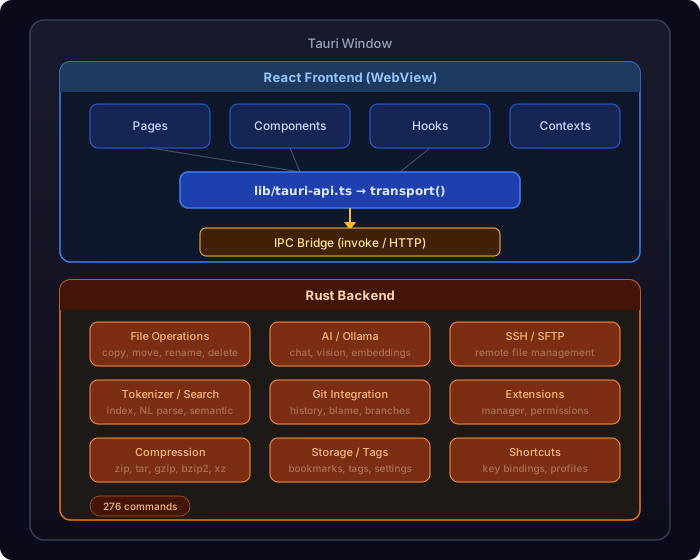
Xplorer follows a two-process architecture powered by Tauri v2: a Rust backend for system operations and a React frontend for the UI.
High-Level Architecture
Communication Flow
- User Action — The user clicks, types, or triggers a keyboard shortcut in the React UI
- Frontend Handler — A React component or hook processes the event
- Transport Call — The frontend calls
TauriAPI.someMethod()which maps totransport('command_name', args)— this routes to Tauri IPC in desktop mode or HTTP in web mode - Rust Command — Tauri routes the IPC call to an
#[tauri::command]function in Rust - System Operation — Rust performs the actual filesystem, network, or AI operation
- Response — The result is serialized as JSON and returned to the frontend
- UI Update — React updates the UI based on the response
Key Design Decisions
Why Tauri v2?
- Small binary size (~10MB vs 100MB+ for Electron)
- Native performance for file operations via Rust
- Security — Granular permission model, no Node.js in the backend
- System WebView — Uses the OS's built-in WebView (Edge/WebView2 on Windows)
Why React + Vite?
- Fast development with HMR (Hot Module Replacement)
- Rich ecosystem for UI components (Radix, Lucide icons)
- TypeScript for type safety across the frontend
- Vite for sub-second build times during development
Why a Monolithic Main.rs?
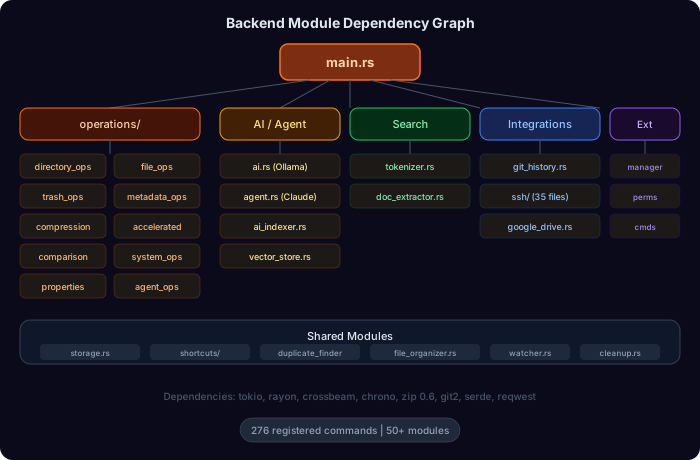
The main.rs file registers 100+ Tauri commands. While large, this is the standard Tauri pattern — all commands must be registered at app initialization. The actual logic lives in separate modules (operations/, ai.rs, ssh.rs, etc.).
Module Dependency Graph
Data Flow Patterns
File Listing
User navigates to folder
  → React calls TauriAPI.readDirectory(path)
    → transport('read_directory', { path })
      → directory_ops::read_directory()
        → std::fs::read_dir() + metadata collection
      → Returns Vec<FileEntry> as JSON
    → React updates file grid
Search
User types search query
  → React calls TauriAPI.searchFiles(query)
    → transport('search_files', { query, limit })
      → tokenizer::search()
        → Looks up query tokens in inverted index
        → Scores and ranks matching files
      → Returns Vec<SearchResult> as JSON
    → React displays search results
AI Chat
User sends message in AI panel
  → React calls TauriAPI.chatWithAI(message, model)
    → transport('chat_with_ollama', { message, model, ... })
      → ai::chat_with_ollama()
        → HTTP POST to Ollama API (localhost:11434)
        → Streams response tokens
      → Returns complete response as String
    → React displays AI response